Introduction to the CMDB
Executive Summary
The Configuration Management Database (CMDB) is a foundational component of ServiceNow that stores information about an organization’s IT infrastructure, including configuration items (CIs), their attributes, and relationships. The Common Service Data Model (CSDM) defines how this data should be structured and related across the ServiceNow ecosystem, enabling service-level reporting, consistency, and operational efficiency.
This module introduces the core concepts, data structures, and terminology that form the basis of a well-managed CMDB.
CMDB
What is a CMDB?
A Configuration Management Database (CMDB) is a repository that contains information about configuration items (CIs) and how they relate to each other and to IT services.
- Purpose: Provides a single source of truth for IT configuration data.
- Goal: Improve service visibility, dependency understanding, and operational decisions.
- Scope: Tracks both IT and non-IT components used to deliver business services.
Example: A CMDB may contain servers, databases, applications, and the business services they support.
At its core, the management of a CMDB is divided into three key pillars:
- Ingest: Populate and consolidate disparate Configuration Item (CI) data into a single Database.
- Govern: Establish processes and controls to maintain CMDB data quality and integrity.
- Insight: Leverage CMDB data for reporting, analysis, and decision making.
Why Implement a CMDB?
Implementing a ServiceNow CMDB transforms how your organization manages and understands its assets. It provides a centralized, accurate, and up-to-date repository of all CIs and their relationships, enabling streamlined operations and proactive issue resolution.
A well-maintained CMDB provides clear visibility to data that can answer critical questions:
- Which services are impacted by an incident?
- What is the impact of a proposed change?
- Are our assets compliant with regulatory requirements?
- What physical assets do we have in our facilities?
- What hardware can be removed when retiring an Application?
IT Related Use Cases
IT Asset Management: Facilitates accurate tracking of hardware, software, and other IT assets. Ensures efficient asset lifecycle management, improves resource utilization, and supports compliance efforts.
Incident and Problem Management: Enables IT teams to quickly identify affected services and dependencies during incidents. Helps accelerate issue resolution and supports effective root cause analysis.
Change Management: Provides visibility into the potential impact of changes on related Configuration Items (CIs) and services. Supports risk assessment and helps minimize service disruptions during change implementation.
Key CMDB Terminology
| Term | Definition | Example |
|---|---|---|
| Configuration Item (CI) | Any component managed to deliver an IT or business service. | Server, router, database, business application |
| Attribute | Descriptive information about a CI. | Name, OS version, manufacturer |
| Relationship Type | Describes how CIs depend on or interact with one another. | “Runs on”, “Depends on” |
| Class | A CMDB table representing a group of CIs with common attributes. | cmdb_ci_server for all server CIs |
| Base Table | The root CI table that all other CI classes extend from. | cmdb_ci |
| Parent/Child Class | Parent = general category, Child = specialized type. | Server → Windows Server |
| CI Reclassification | Changing a CI’s class type. | Upgrading Server → Windows Server |
| Logical CI | Non-physical entities that support services. | Service Offering, Business Application |
| Principle Class | Restricts visible CI classes for specific processes. | Used in Incident, Problem, or Change forms |
Asset vs Configuration Item
An Asset is something that has intrinsic financial value to a person or an enterprise. The primary focus of asset management is tracking the financial and contractual aspects of owning property.
A Configuration Item (CI) is an entity or thing that you want to track that is required for the delivery of a service. The primary focus of configuration management is to track items for operational use and make them available to other processes (ITSM, Security, etc.).
An Asset is often a Configuration Item, but Configuration Items are not necessarily Assets (e.g., a logical Business Service). On the Now platform, a hardware asset and its corresponding CI are connected throughout their lifecycles.
| Comparison | Asset | Configuration Item (CI) |
|---|---|---|
| Purpose | Financial tracking | Operational tracking |
| Lifecycle | Procurement → Disposal | Deployment → Retirement |
| Stored In | Asset Management application | CMDB |
| Created When | Purchased or discovered | Discovered or manually added |
Configuration and Asset Management Lifecycles
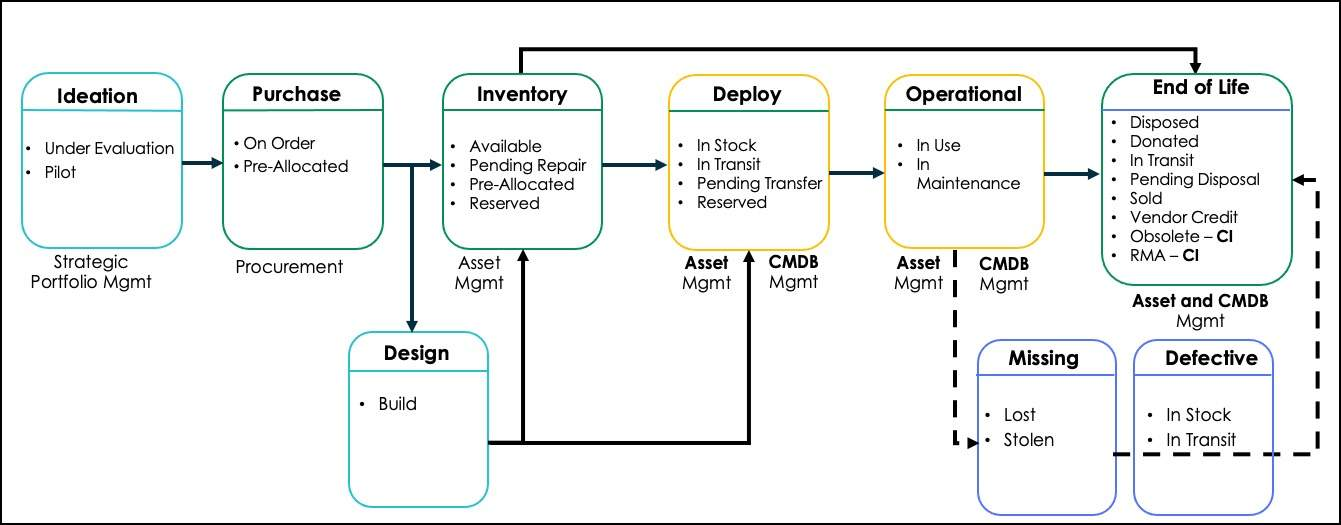
An asset becomes a Configuration Item (CI) once it is deployed into the operational environment. It remains a CI throughout its operational lifecycle until it is either returned to inventory or decommissioned and disposed of.
Configuration Management focuses on the operational aspects tracking relationships, dependencies, and the current state of CIs to maintain service reliability. IT Asset Management, on the other hand, emphasizes the financial and contractual aspects managing costs, licenses, and asset value throughout the lifecycle.
CMDB Class Structure & Attributes
CMDB classes are groups of CIs that share attributes and are stored in their own table. The class structure is hierarchical, where children are specializations of their parent.
Hierarchy Example: Configuration Item > Hardware > Computer > Server > Windows Server
As part of a successful CMDB initiative, it is critical to populate key attributes. These can be divided into two types:
- Discoverable attributes: Can be automatically collected by a discovery tool (e.g., Name, Manufacturer, Operating System, IP Address).
- Non-Discoverable attributes: Often require manual input and are crucial for routing incidents, problems, and changes (e.g., Support Group, Approval Group, Managed By Group).
The Common Service Data Model (CSDM)
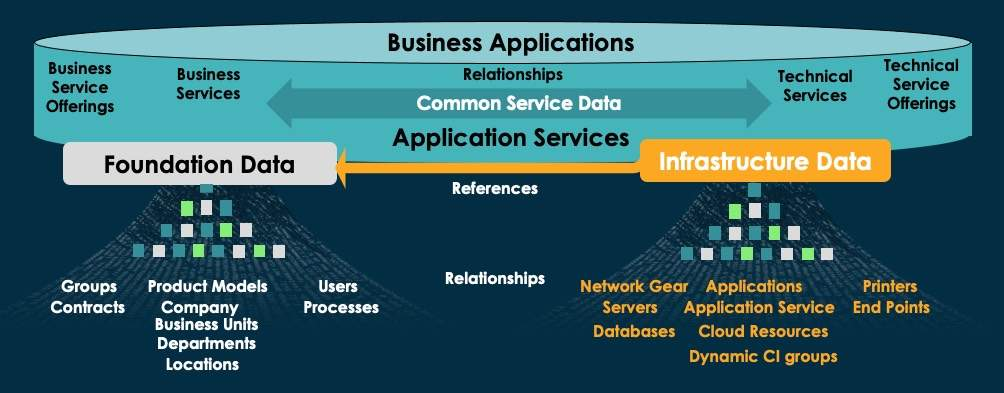
The Common Service Data Model (CSDM) is a framework for structuring and standardizing CMDB data across all ServiceNow products.
Purpose:
- Provides consistent service modeling guidance.
- Enables service-level reporting.
- Defines where and how to store service-related data.
Key Benefits:
- Ensures correct mapping between ServiceNow products and CMDB tables.
- Improves cross-application integration and reporting accuracy.
Application vs. Application Service vs. Business Application
In ServiceNow, the terms Application, Application Service, and Business Application are distinct but related components within the CMDB.
| Aspect | Business Application | Application Service | Application |
|---|---|---|---|
| Description | Represents all software and infrastructure environments (Dev, Test, Prod) configured to provide business functionality. | A service type that logically represents a deployed application stack. | Any deployed program, module, or group of programs designed to provide specific functionality on compute infrastructure (the installed “bits & bytes”). |
| Scope | Connects IT to business outcomes; supports business capabilities. | Operational delivery of a specific business application; connects the technical layer with the business layer. | Technical software components that form the foundation of application services. |
| CMDB Class | cmdb_ci_business_app | cmdb_ci_service_auto | cmdb_ci_appl |
| Key Details | Not an operational CI. Not used in Incident, Problem, or Change. Not version specific. | Is an operational CI. Used in Incident, Problem, and Change for impact analysis. | Is an operational CI. Used in Incident, Problem, and Change. Represents a unique deployment on a specific host. |
| Creation Method | Manual. | Manual mapping, Service Mapping (via entry point, tags, or ML), or Dynamic CI Group. | ServiceNow Discovery, Service Graph Connectors, or Service Mapping. |
| Examples | Payroll System | Americas Payroll Application Service, APAC Payroll Application Service | MySQL, Apache Tomcat |
Additional Resources
Deploying a Trustworthy CMDB
A trusted CMDB begins with a clear direction, defined goals, actionable objectives, and measurable business outcomes.
When setting goals, ask:
- What do you want to accomplish?
- How are you going to accomplish it? (Approach, constraints, and assumptions)
- Why do you need to accomplish it? (Business outcomes your CMDB supports)
- How will you measure progress and benefits
Pillar 1: Ingest Tools (Populating the CMDB)
| Tool | Description | Key Features | License |
|---|---|---|---|
| ServiceNow Discovery (Horizontal / Agentless Discovery) | Automatically identifies devices and applications in the network. | - Populates CMDB with accurate, real-time data. - Maps dependencies between network devices, servers, and apps. | Yes (Part of ITOM Visibility) |
| Service Mapping (Top-Down / Tag-Based / ML-Powered) | Creates a full map of services and their supporting infrastructure. | - Shows service-to-infrastructure relationships. - Automatically updates as changes occur. | Yes (Part of ITOM Visibility) |
| Agent Client Collector (ACC) (Agent-Based Discovery) | Installs an agent on each host for real-time visibility. | - Collects detailed hardware/software data. - Includes usage data not possible with agentless discovery. | Yes |
| Service Graph Connectors | Integrates ServiceNow with external systems (e.g., Azure, Intune, SCCM, Jamf, AWS). | - Imports and syncs data across systems. - Ensures data consistency via prebuilt connectors. | Yes |
| IntegrationHub ETL | Simplifies Extract, Transform, Load (ETL) operations for external data sources. | - Automates data normalization. - Aligns external data with CMDB structure. | No |
| Import Sets & Transform Maps | Legacy import method using staging tables. | - Supports CSV, Excel, and API imports. - Maps data fields using transform scripts. | No |
Pillar 2: Govern Tools (Maintaining Data Quality)
| Tool | Description | Key Features | License |
|---|---|---|---|
| CMDB Health Dashboard | Monitors CMDB data health and integrity. | - Provides scores for Completeness, Correctness, and Compliance. - Identifies classes impacting health. | No |
| CMDB Data Manager | Manages lifecycle policies and data certification. | - Data Certification: Validate data automatically. - Lifecycle Policies: Define retirement and deletion rules. - Attestation Policies: Confirm physical existence of assets. | No |
| Duplicate CI Remediation Wizard | Guides users in merging or deleting duplicate CIs. | - Detects duplicates automatically. - Provides step-by-step resolution UI. | No |
| De-Duplication Templates | Enables automated bulk duplicate cleanup. | - Uses preconfigured matching rules. - Can run on schedules for continuous hygiene. | No |
Pillar 3: Insight Tools (Using the Data)
| Tool | Description | Key Features | License |
|---|---|---|---|
| CMDB Query Builder | Build complex queries visually without scripting. | - Drag-and-drop interface. - Supports advanced AND/OR logic filters. | No |
| Unified Map | Provides an interactive visualization of CI relationships. | - Displays dependencies and impact paths. - Aids in change and incident management. | No |
| CMDB & CSDM Data Foundations Dashboards | Aligns CMDB data with CSDM best practices. | - Tracks data quality and compliance. - Includes actionable playbooks and remediation guidance. | No |