ClipVault
Introduction
ClipVault is a private, self-hosted clip archive I built for my friend group. Discord buries clips fast, and search is poor enough that finding “that one play from last month” is nearly impossible. ClipVault gives those moments a permanent, searchable home.
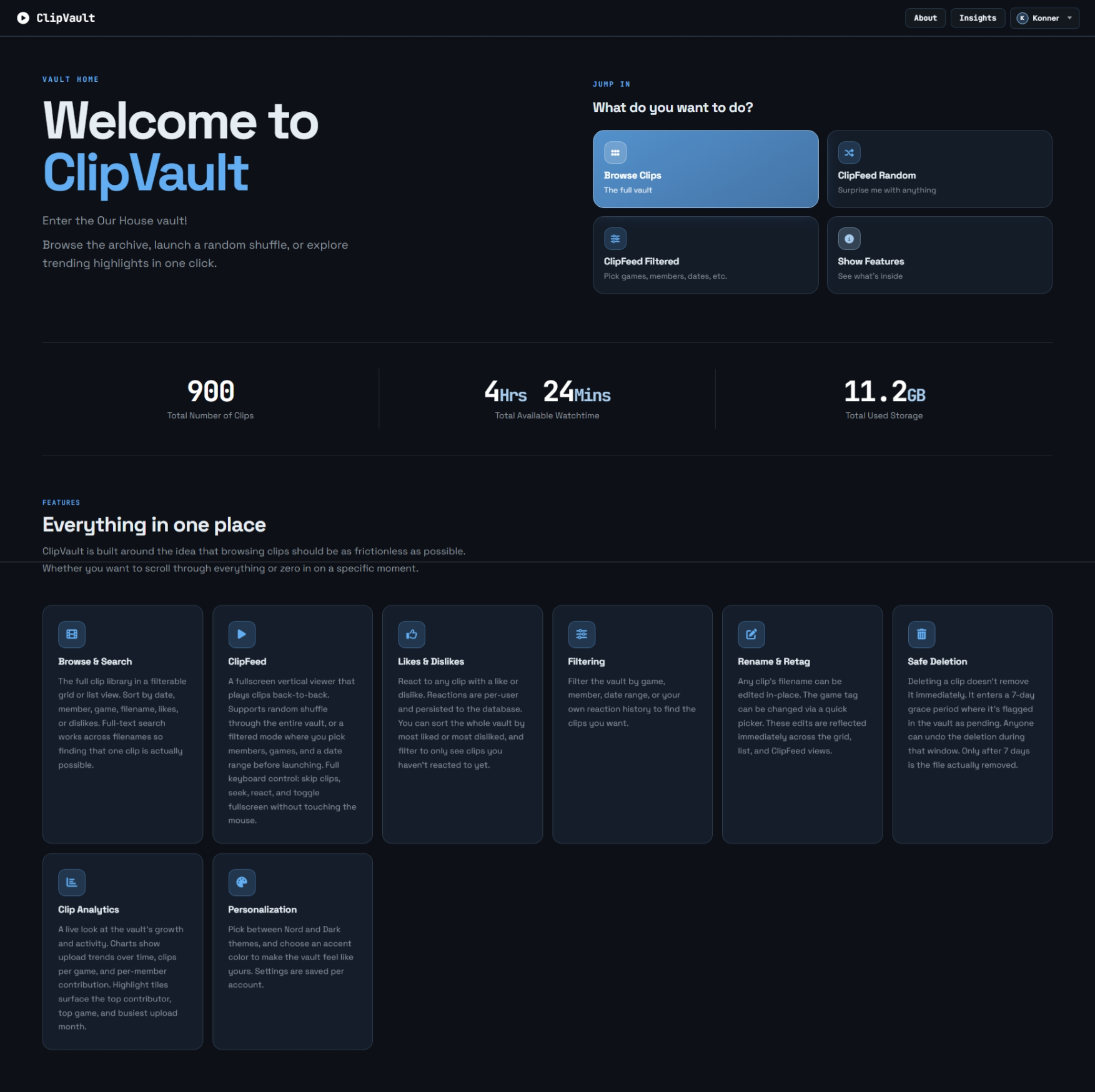
Anyone in the group drops a video into Discord, a bot asks which game it’s from, and a pipeline compresses it, makes a thumbnail, pulls out metadata, and publishes it to a web app with accounts, filters, reactions, a fullscreen clip feed, and a stats dashboard.
This is the biggest thing I’ve built outside of work, because it isn’t just an app. I run all of it: the hosting, the data, the automation, the Discord bot, and the networking that lets my friends open it in a browser without installing a VPN.
Objectives
- Give Discord clips a permanent, searchable home.
- Make uploading effortless: drop a clip in Discord, pick a game, done.
- Keep it private. Accounts are required and the public can’t browse the library.
- Let friends join with just a browser and no VPN client.
- Keep the whole stack reproducible from a Docker Compose file.
- Automate everything after the upload: processing, metadata, cleanup.
How a Clip Gets In
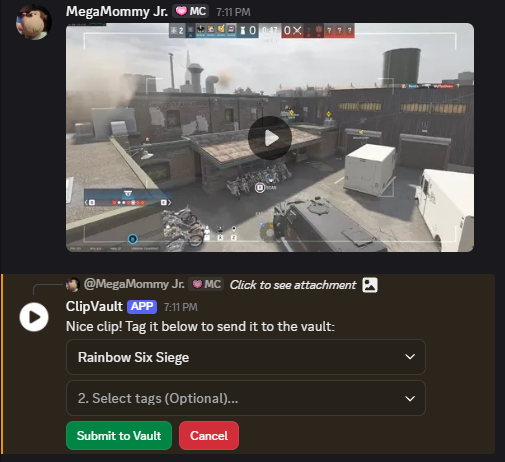
- Upload in Discord. Someone posts a video. A small Discord bot (Python,
discord.py) notices the video attachment and replies with a menu: a required game dropdown, optional tags (Highlight, Lowlight, Crash Out, Funny, and so on), and Submit and Cancel buttons. - Hand off to n8n. On submit, the bot posts the file URL, filename, size, game, tags, and uploader to a webhook on my self-hosted n8n instance, then reacts to the original message with ✅ (or ❗ if the hand-off failed).
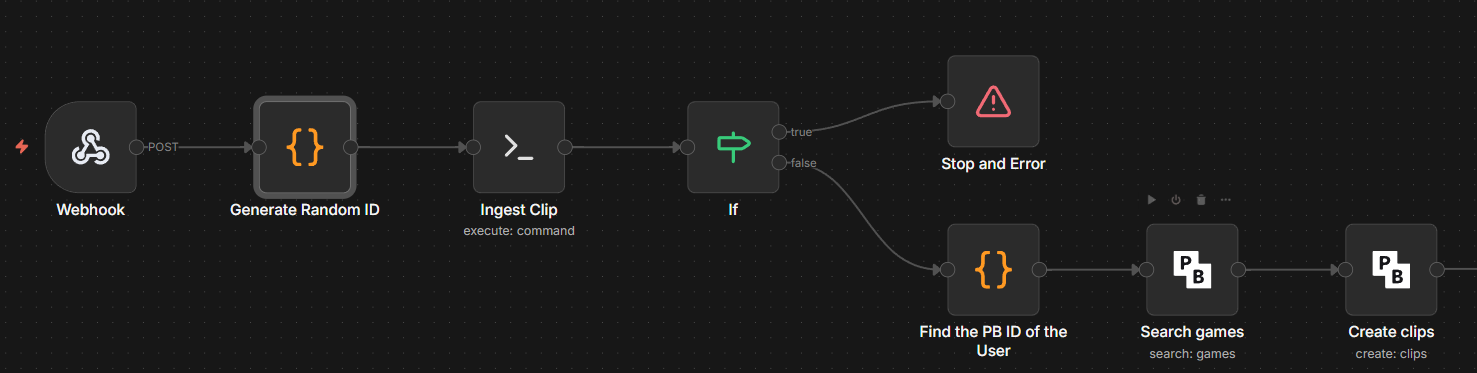
- Process the video. n8n generates a random clip ID and runs FFmpeg in a throwaway Docker container. It writes the video as a web-friendly MP4 with
faststartso playback begins before the download finishes, extracts a frame at the 5-second mark as a 720px WebP thumbnail, and uses FFprobe to read the duration. File size comes fromstat. - Fail loudly. An
Ifnode checks the result. A failure goes to a Stop and Error node instead of creating a half-finished record. - Publish. On success, n8n looks up the uploader’s PocketBase user, matches the game against the
gamescollection, and creates theclipsrecord. The clip shows up in the vault.
    flowchart LR
  A[Discord upload] --> B[Discord bot<br/>game + tags menu]
  B -->|webhook| C[n8n]
  C --> D[FFmpeg container<br/>thumbnail + MP4 + metadata]
  D --> E{Success?}
  E -- no --> F[Stop and Error]
  E -- yes --> G[PocketBase<br/>clips record]
  G --> H[ClipVault web app]
The processing step is a single docker run against the media folder:
docker run --rm -v /mnt/VAULT/ClipVault:/data --entrypoint /sh jrottenberg/ffmpeg:latest -c '
  THUMB="/data/video/thumbs/$CLIP_ID.webp"
  OUTPUT="/data/video/$CLIP_ID.mp4"
  ffmpeg -y -i "$DISCORD_URL" -ss 00:00:05 -vframes 1 \
    -vf "scale=720:-1:flags=lanczos" -q:v 85 "$THUMB" \
    -c copy -movflags +faststart "$OUTPUT"
  DURATION=$(ffprobe -v error -show_entries format=duration \
    -of default=noprint_wrappers=1:nokey=1 "$OUTPUT")
  COMP_SIZE=$(stat -c%s "$OUTPUT")
  echo "{\"duration\": $DURATION, \"compressed_size\": $COMP_SIZE}"
'
The thumbnail is generated once, up front. The browser never has to build previews, so the grid loads fast.
The Workflows
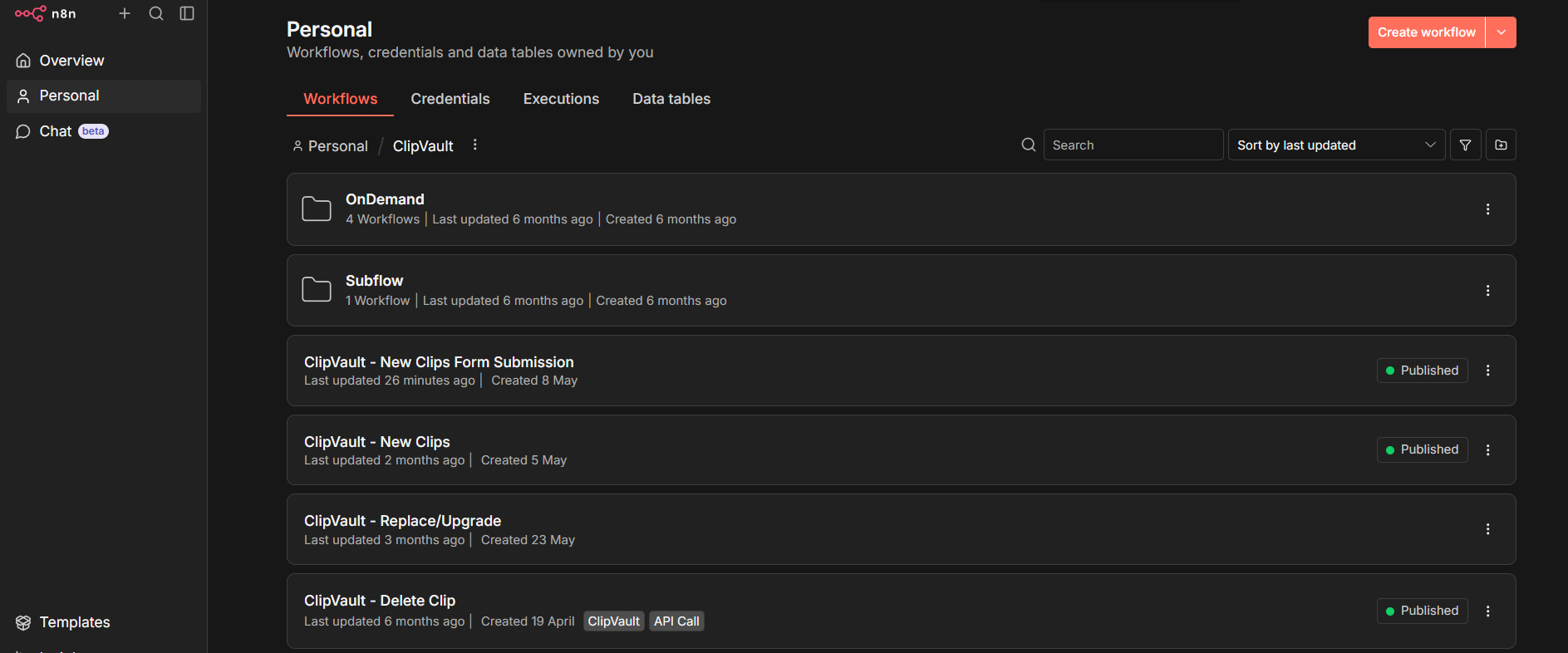
n8n handles more than ingest. Everything that happens to a clip after the bot is a workflow, grouped in a ClipVault folder:
| Workflow | What it does |
|---|---|
| New Clips | Webhook from the bot, then process and publish (above) |
| New Clips Form Submission | On-demand upload path for clips that don’t come through the Discord prompt |
| Replace / Upgrade | Re-process or swap an existing clip’s file |
| Delete Clip | API-triggered deletion that feeds the grace-period flow |
| OnDemand / Subflow folders | Reusable pieces and manually triggered maintenance jobs |
Features
Browse, search, and filter
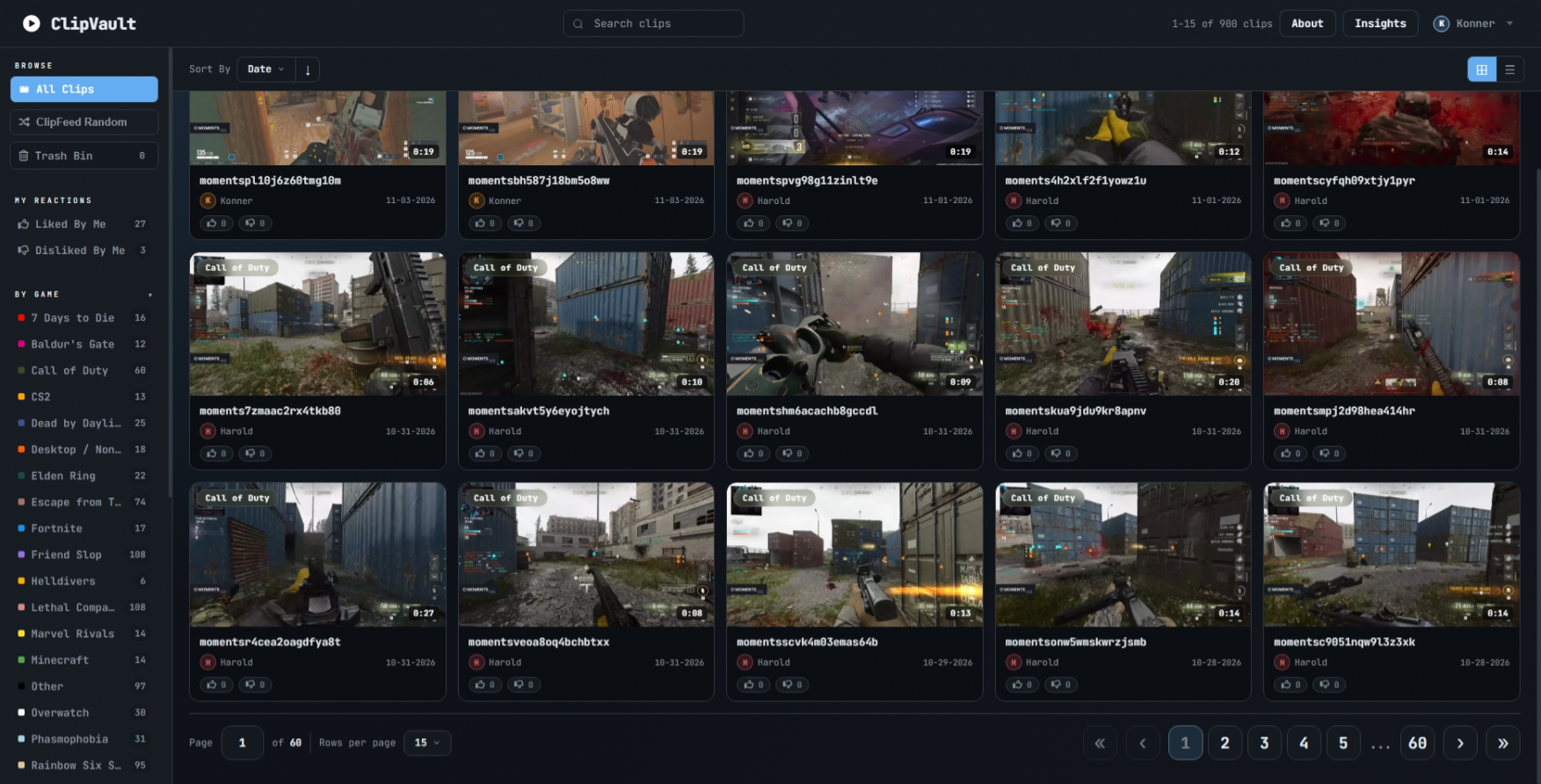
The library shows as a grid or list. Sort by date, member, game, filename, duration, likes, or dislikes, and filter by game, member, date range (with quick presets), or your own reaction history.
ClipFeed
A fullscreen, vertical viewer that plays clips back to back, either shuffled across the whole vault or filtered by members, games, tags, and dates. It has full keyboard control for skipping, seeking, reacting, and toggling fullscreen.
Reactions
Likes and dislikes are stored per user per clip. Counts are aggregated at query time, and you can sort by most liked or filter to clips you haven’t rated.
Rename and retag
Clip names, games, and tags can be edited in place from the grid, list, or ClipFeed, and the change shows up everywhere immediately.
Safe deletion
Deleting a clip flags it instead of removing it. A pending_deletion record starts a 7-day grace period during which any member can hit “Keep” to restore it. If nobody does, an automated job removes the video, thumbnail, and database record. A Trash Bin view lists what is pending.
Insights
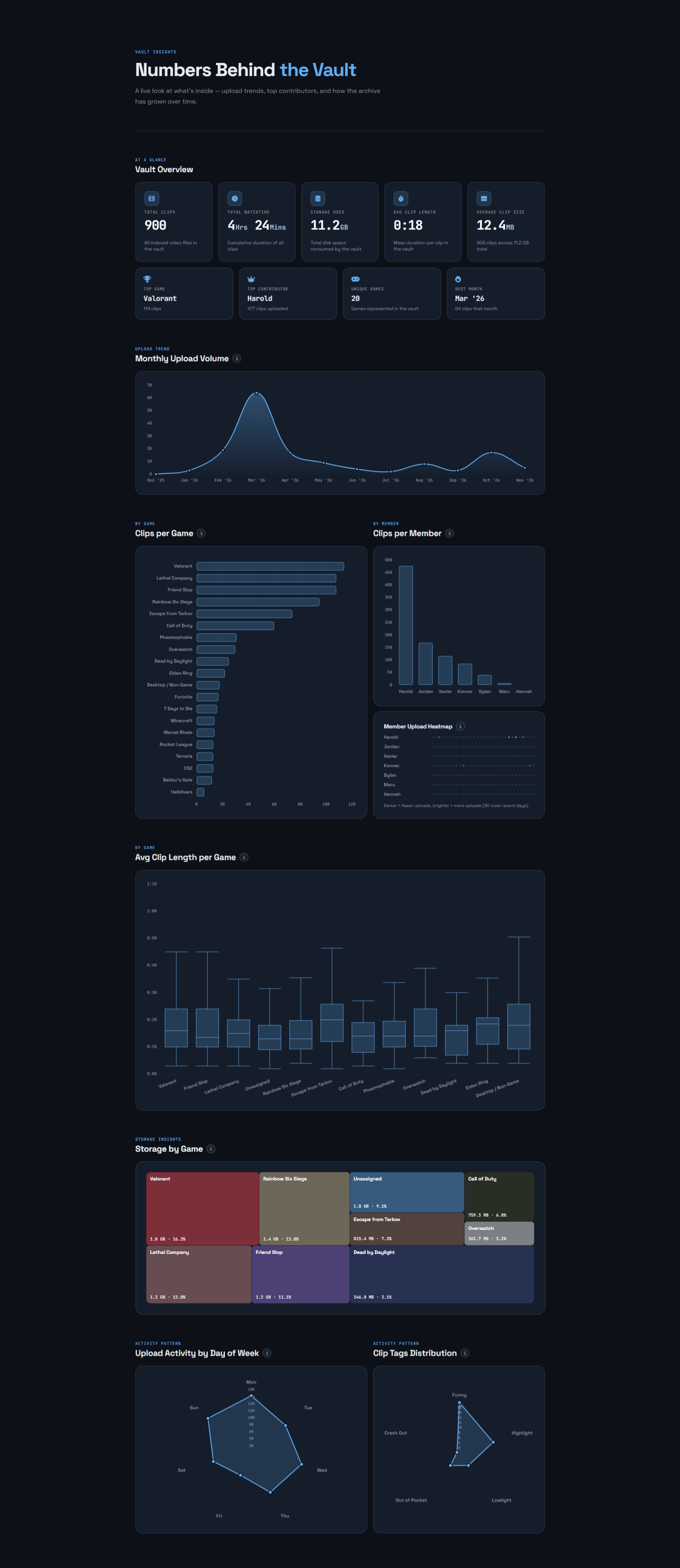
A live analytics page built on PocketBase view collections: upload volume by month, clips per game and per member, average clip length per game, storage by game, and upload activity by day of week.
Theming
Nord and Dark themes with Blue, Purple, and Orange accents, saved in the browser. Colors are CSS variables throughout, so a new component never hardcodes a hex value.


Architecture
The whole stack is defined in Docker Compose.
| Component | Role |
|---|---|
| PocketBase | Single-binary backend: database for clip metadata, user auth, and a REST API |
| Caddy | Serves the static frontend and clip files, reverse-proxies /api/* to PocketBase, handles clean URLs and caching rules |
| Tailscale (Funnel) | Publishes the site on a public HTTPS address without opening router ports |
| n8n | All automation: ingest, replace, delete, scheduled cleanup |
| Discord bot | The front door: detects clips and collects the game and tags |
| FFmpeg / FFprobe | Thumbnails, web-optimized MP4s, duration |
| Vanilla HTML/CSS/JS | The frontend, using the PocketBase JS SDK. No framework, no build step |
services:
  ts-clipvault:            # Tailscale node that owns the network namespace
    image: tailscale/tailscale:latest
    hostname: clipvault
    environment:
      - TS_AUTHKEY=<redacted>
      - TS_STATE_DIR=/var/lib/tailscale
      - TS_SERVE_CONFIG=/config/funnel.json   # what Funnel publishes
    cap_add: [net_admin, sys_module]
    restart: unless-stopped

  pocketbase:
    image: ghcr.io/muchobien/pocketbase:latest
    command: serve --http=0.0.0.0:8090 --dir=/pb_data
    volumes:
      - ./pb_data:/pb_data
      - ./pb_migrations:/pb_migrations
      - ./pb_hooks:/pb_hooks
    restart: unless-stopped

  caddy:
    image: caddy:alpine
    network_mode: service:ts-clipvault        # joins Tailscale's network
    volumes:
      - ./html:/usr/share/caddy:ro
      - ./video:/usr/share/caddy/video:ro
      - ./Caddyfile:/etc/caddy/Caddyfile:ro
    depends_on: [pocketbase]
The Discord bot runs from its own small Compose file: a built Python image with the bot script mounted read-only.
Networking: No VPN Required
I wanted friends to open a link and log in, not install a client. I also didn’t want to forward ports on my home router.
The answer is Tailscale Funnel. A Tailscale container runs as the stack’s entry point, and Funnel publishes the site on a public *.ts.net HTTPS address with a managed certificate. The key detail is Caddy’s network_mode: service:ts-clipvault: Caddy shares the Tailscale container’s network namespace, so Funnel traffic lands directly on Caddy’s port. Caddy then routes it either to static files or to PocketBase over the internal Docker network.
The result is public HTTPS with no open ports on my router and no VPN for friends, while the site itself is still locked behind a login.
Data Model
The database is small. It’s mostly metadata, and the videos stay on disk.
| Collection | Purpose |
|---|---|
clips | One record per clip: filename, URL, poster, game, timestamp, tags, duration, size, thumbnail |
users | PocketBase auth collection |
clip_reactions | One record per user per clip: up or down |
pending_deletion | A clip flagged for deletion, removed on restore or after 7 days |
games | Game catalogue that drives the filters and pickers |
| View collections | game_distribution, member_contribution, monthly_uploads, vault_summary, clips_ranked: aggregations that power the Insights and Home stats |
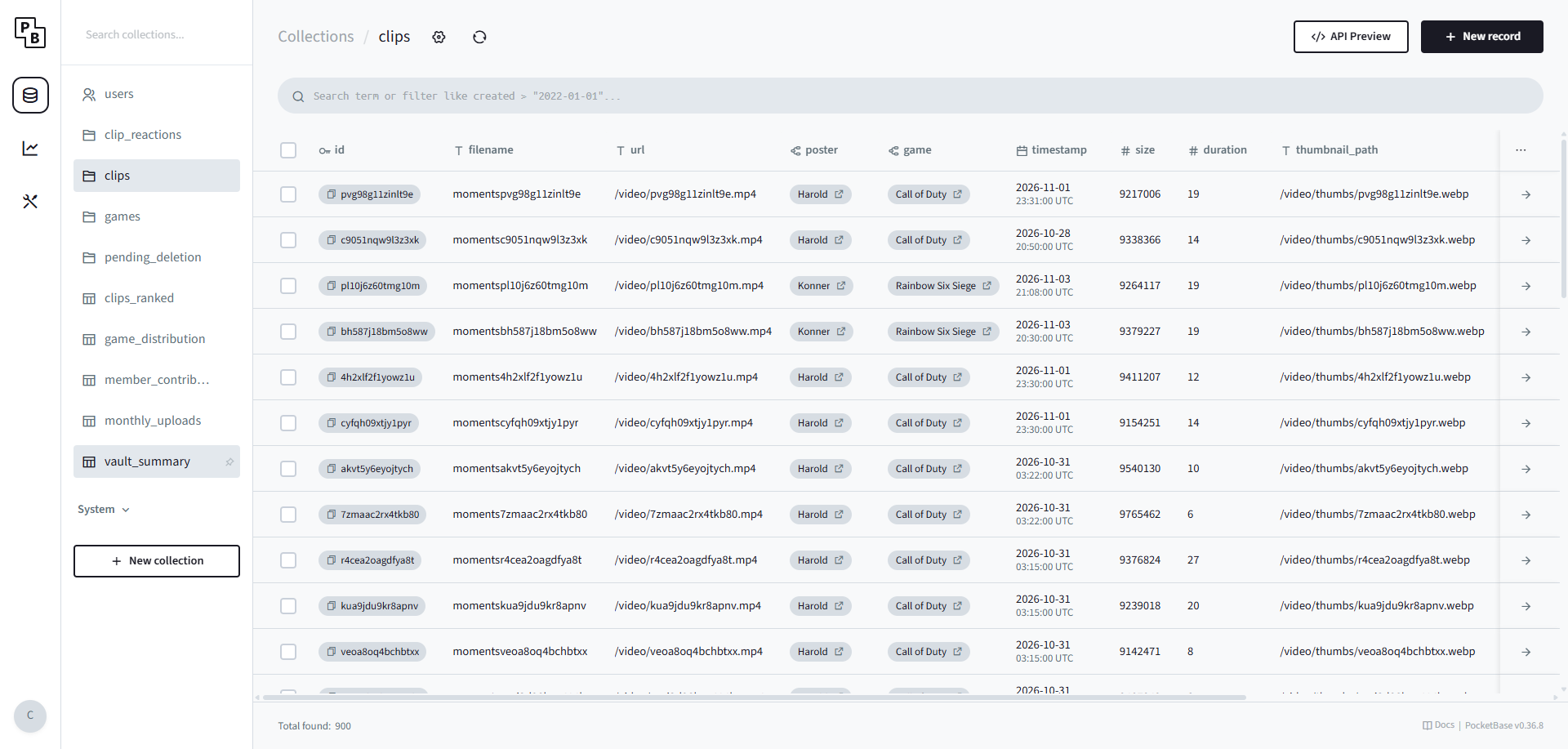
poster and game are relations to the users and games collections, so renaming a game or merging two of them is one edit rather than hundreds.
Technology Stack
- PocketBase
- Caddy
- Tailscale (Funnel)
- Docker Compose
- n8n
- Python,
discord.py - FFmpeg and FFprobe
- Vanilla HTML, CSS, and JavaScript
Summary
ClipVault started as a way to stop losing good clips and turned into a complete small platform: a chat-native ingest flow, an automated media pipeline, a self-hosted backend, and a front end my friends actually use. It’s the project where I got to own the entire path, from a Discord upload to a public HTTPS site with logins, and keep it running.