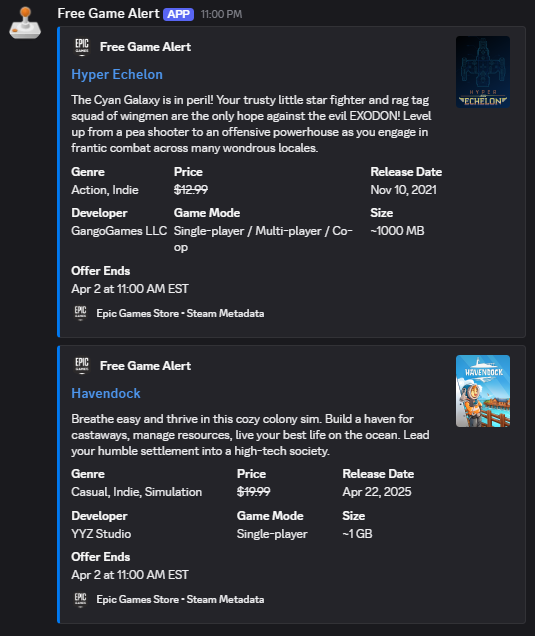
Epic Games Free Games x Discord Webhook
Overview
This project features an n8n workflow designed to bridge the gap between the Epic Games Store and Discord. While Epic Games provides a rotating selection of free titles, the metadata provided in their public API can sometimes be sparse. This workflow automatically scrapes the Epic Games Store for active promotions and then cross-references those titles with the Steam API to enrich the notifications with detailed game metadata, such as genres, original pricing, developer info, and install sizes.
By integrating both platforms, this automation provides a comprehensive “Free Game Alert” directly to a Discord channel, ensuring you and your friends never miss a high value claim.
Workflow Overview
The workflow is designed for efficiency and to prevent unnecessary notifications in your Discord server. It includes an action step, Extract Unique Games from the List, which compares the current list of games with the list from the last successful run. A message is only sent when new free games are detected, ensuring that your Discord server is notified only when new content becomes available.
Core Components
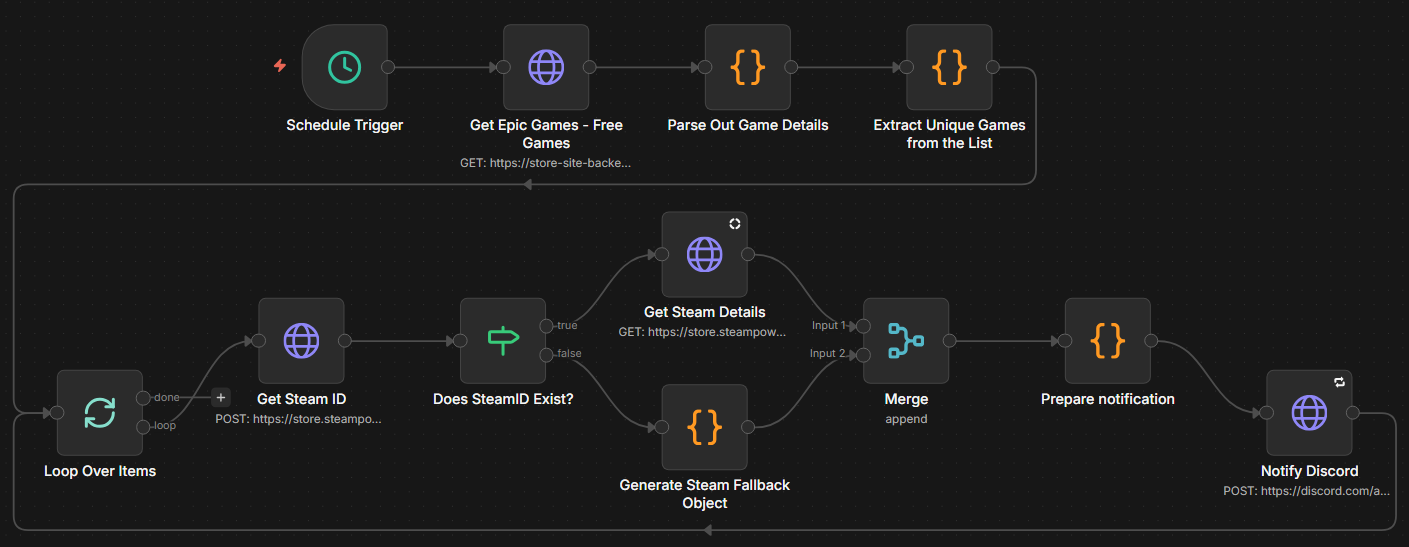
The workflow consists of the following key steps:
- Schedule Trigger – Automatically runs the workflow on a daily schedule.
- Epic Games API Integration – Retrieves current freeGamesPromotions data directly from Epic’s backend, including titles, promotional end dates, and thumbnails.
- Parse Out Game Details - Extracts relevant data from the API response, such as titles, promotional end dates, and thumbnail URLs.
- Unique Game Filter – Compares the current list of free games with previous n8n execution data to identify newly available titles.
- Get Steam ID – Queries the Steam API using the game title to retrieve its unique Steam ID.
- Get Steam Details – Uses the Steam ID to fetch additional metadata, including genres, original pricing, developer information, and install size.
- Prepare notification – Formats the collected data into a Discord webhook payload.
- Notify Discord – Sends the formatted notification to the configured Discord webhook URL.
Below is a visual overview of the workflow in n8n:
1. Discord Webhook Setup
Before n8n can send messages to Discord, you need to create a webhook in your Discord server:
- Open Discord and right-click on the server icon/name.
- Select Server Settings → Integrations.
- Under Webhooks, click Create Webhook.
- Configure:
- Name – e.g., Epic Games Bot
- Avatar – optional bot profile image
- Channel – where notifications should post
- Click Copy Webhook URL.
Keep this URL safe — it will be used in the n8n workflow to send messages.
2. Workflow in n8n
The workflow runs on a daily schedule and performs the following section of steps:
2.1 Trigger
- Schedule Trigger – Configured to run everyday at 12 PM.
2.2 Call and Parse Epic Games Store
HTTP Request
- Makes a GET request to the Epic Games Store API endpoint for free game promotions.
- URL:
https://store-site-backend-static.ak.epicgames.com/freeGamesPromotions?locale=en-US&country=US&allowCountries=US - Returns a JSON response containing details about free game promotions.
Parse Out Game Details
- JavaScript node that processes the API response to extract relevant details for each free game.
- The script navigates through the nested JSON structure to find the array of promoted games and extracts the title, description, original price, thumbnail image URL, store URL, and promotional dates.
| |
Example output:
[
{
  "title": "Hyper Echelon",
  "description": "The Cyan Galaxy is in peril! Your trusty little star fighter and rag tag squad of wingmen are the only hope against the evil EXODON! Level up from a pea shooter to an offensive powerhouse as you engage in frantic combat across many wondrous locales.",
  "originalPrice": "$12.99",
  "imageUrl": "https://cdn1.epicgames.com/spt-assets/866f5f0834324794a87759b5f4854636/hyper-echelon-11w7f.png",
  "storeUrl": "https://store.epicgames.com/en-US/p/hyper-echelon-2d23ff",
  "startDateISO": "2026-03-26T15:00:00.000Z",
  "endDateISO": "2026-04-02T15:00:00.000Z",
  "startDate": "Mar 26 at 11:00 AM EST",
  "endDate": "Apr 2 at 11:00 AM EST",
  "dateString": "Free Now - Apr 2 at 11:00 AM EST"
},
{
  "title": "Hyper Echelon",
  "description": "The Cyan Galaxy is in peril! Your trusty little star fighter and rag tag squad of wingmen are the only hope against the evil EXODON! Level up from a pea shooter to an offensive powerhouse as you engage in frantic combat across many wondrous locales.",
  "originalPrice": "$12.99",
  "imageUrl": "https://cdn1.epicgames.com/spt-assets/866f5f0834324794a87759b5f4854636/hyper-echelon-11w7f.png",
  "storeUrl": "https://store.epicgames.com/en-US/p/hyper-echelon-2d23ff",
  "startDateISO": "2026-03-26T15:00:00.000Z",
  "endDateISO": "2026-04-02T15:00:00.000Z",
  "startDate": "Mar 26 at 11:00 AM EST",
  "endDate": "Apr 2 at 11:00 AM EST",
  "dateString": "Free Now - Apr 2 at 11:00 AM EST"
}
]
2.3 Change Detection (Unique Game Filter)
Extract Unique Games from the List
- Runs JavaScript to hash the list of titles.
- Compares against data from the last workflow execution.
- Returns the list of new games if unique entries are found
More information on this approach and the getWorkflowStaticData method can be found in the n8n documentation.
| |
2.4 Get Steam Metadata
Get Steam ID
- JavaScript node that takes the game title and queries the Steam API to find the corresponding Steam App ID.
- Makes a POST request to
https://store.steampowered.com/api/storesearch?term=GAME_TITLE&l=english&cc=USendpoint, whereGAME_TITLEis the title of the game from the Epic Games Store.
Does SteamID Exist
- Conditional node that checks if a Steam App ID was returned from the previous step (json.total is not equal to 0)
- If a Steam ID exists, the workflow continues to the next step to fetch detailed metadata. If not, it skips to the notification preparation step with only Epic Games data.
Get Steam Details
- HTTP Request node that takes the Steam App ID and queries the Steam API for detailed metadata about the game.
- Makes a GET request to
https://store.steampowered.com/api/appdetails?appids=STEAM_APP_ID&l=english&cc=USendpoint, whereSTEAM_APP_IDis the ID retrieved from the previous step. - Extracts relevant metadata such as genres, original pricing, developer info, and install sizes to enrich the Discord notification.
Example Steam metadata output:
{
  "953330": {
    "success": true,
    "data": {
      "name": "Hyper Echelon",
      "steam_appid": 953330,
      "short_description": "The Cyan Galaxy is in peril! Your trusty little star fighter and rag tag squad of wingmen are the only hope against the evil EXODON!",
      "genres": [
        {
          "id": "1",
          "description": "Action"
        },
        {
          "id": "23",
          "description": "Indie"
        }
      ],
      "price_overview": {
        "currency": "USD",
        "final_formatted": "$12.99"
      },
      "developers": ["GangoGames LLC"],
      "header_image": "https://shared.akamai.steamstatic.com/store_item_assets/steam/apps/953330/header.jpg"
    }
  }
}
2.5 Notification Handling
- Prepare Notification
- JavaScript node that takes the combined data from both the Epic Games Store and Steam API to format a rich embed message for Discord. The script constructs a payload that includes the game title, description, genres, Price, release date, developer, game modes, install size, and promotional end date. It also includes the game’s thumbnail image and a link to the store page.
- The payload utilzes Discord support for embeds to create a visually appealing message that stands out in the channel compared to plain text notifications.
- The script also includes fallback logic to ensure that if certain metadata is missing from either source, the notification still contains useful information without breaking the formatting.
- The payload is structured to include a username and avatar for the webhook, making it clear that the message is coming from the “Free Game Alert” bot or whatever name you choose.
| |
- Notify Discord
- HTTP Request node that will take the formatted payload from the previous step and send it to the Discord webhook URL using a POST request.
Outcome
The result of this workflow is a rich, informative Discord message that alerts you to new free games available on the Epic Games Store, complete with detailed metadata from Steam when available. This allows you and your friends to quickly see which games are free, what they are about, and when the promotion ends, all without having to manually check the store.
- Automated Notifications – Daily schedule ensures you never miss a free game.
- Rich Metadata – Steam API integration provides detailed game info beyond what Epic’s API offers.
- Unique Game Detection – Only new free games trigger notifications, preventing spam.
- No Need for Authentication Keys - Both the Epic Games Store and Steam APIs used in this workflow are public endpoints that do not require authentication keys for the specific data being accessed. This allows for a straightforward setup without the need to manage API credentials.
Example Discord message: